
BPSK2 5V Sync USB LED Strip Light Dream Color Ambient TV Kit RGB for
Your money is held until you receive your order, plus 7 days to report a problem. Refund if it never arrives or is not as described. Payments go through secure, licensed providers (Paystack, OPay).
12 - 19 days
Ships by standard shipping. Delivery times are estimates and may vary based on customs clearance.
7-day return window
Item must be unused and in original packaging.
Refund via: Original payment method
Warranty: no manufacturer warranty unless the description says so. Faulty, damaged or not-as-described items are covered by our 7-day buyer protection.
BPSK2 5V Sync USB LED Strip light 5050 RGB Dream Color Ambient TV Kit for Desktop PC Screen Background lighting 2M 3M 4M 5M 6M Step 1: Check if your device is compatible with BPSK2 (IMPORTANT!) Compatible: Windows 7 ~ Windows 11 OS Incompatible: Mac OS, Parallels desktop, and other Windows image sys...
BPSK2 5V Sync USB LED Strip light 5050 RGB Dream Color Ambient TV Kit for Desktop PC Screen Background lighting 2M 3M 4M 5M 6M
Step 1: Check if your device is compatible with BPSK2 (IMPORTANT!)
Compatible: Windows 7 ~ Windows 11 OS
Incompatible: Mac OS, Parallels desktop, and other Windows image systems.
Compatible: Most Allwinner and Rockchip Chip TV Box and TV Stick
Incompatible: Most Amlogic Chip TV Box and TV Stick, Pads, Phones, Projectors
Uncertain Compatibility Devices: Raspberry Pi and Linux.
Step 2: Install LED strips Kits
1. Choose the right kits for your monitor. Measure roughly the installation position on the back of the monitor or TV.
2. Install LED strip corner connectors onto the corner where the LED strip will be installed.
Avoid getting sticky fingers, try not to let your fingers touch the adhesive surface of the glue.
3. Start fixing the LED strip from any position at the bottom corner. Usually, we start from the bottom left corner or bottom right corner.
4. Cut off the excess strip light at the mark.
5. Secure the control box
– Connect the LED strip to the control box
– Connect the other end of the LED strip to the power supply.
Step 3: Follow the instructions to download, install and set up
Download AmbiBox for PC:
1. Please install it on the default C drive in Windows, otherwise some characters may not display correctly.
2. You cannot use the Windows image system.
Download the Ambient Light Application for Android
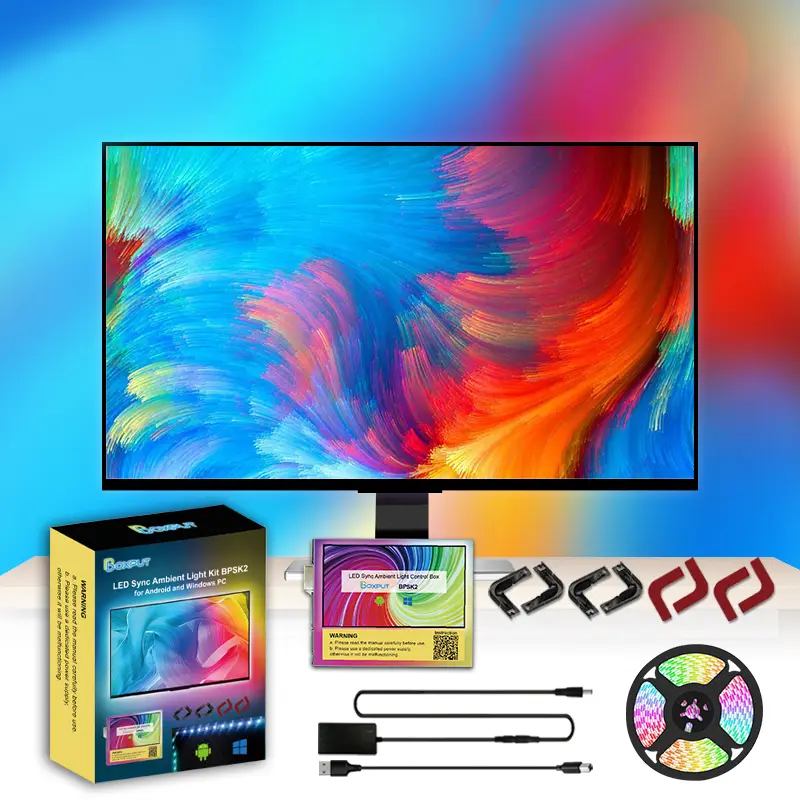
Tax excluded, add at checkout if applicable
Color:
Lamp Power(W):
Length:
Quantity
Service commitment
Shipping: ₦9,701.4
12 - 19 days
Return & Refund
7-day return window
Secure Payment
Buyer protection guaranteed
BPSK2 5V Sync USB LED Strip light 5050 RGB Dream Color Ambient TV Kit for Desktop PC Screen Background lighting 2M 3M 4M 5M 6M
Step 1: Check if your device is compatible with BPSK2 (IMPORTANT!)
Compatible: Windows 7 ~ Windows 11 OS
Incompatible: Mac OS, Parallels desktop, and other Windows image systems.
Compatible: Most Allwinner and Rockchip Chip TV Box and TV Stick
Incompatible: Most Amlogic Chip TV Box and TV Stick, Pads, Phones, Projectors
Uncertain Compatibility Devices: Raspberry Pi and Linux.
Step 2: Install LED strips Kits
1. Choose the right kits for your monitor. Measure roughly the installation position on the back of the monitor or TV.
2. Install LED strip corner connectors onto the corner where the LED strip will be installed.
Avoid getting sticky fingers, try not to let your fingers touch the adhesive surface of the glue.
3. Start fixing the LED strip from any position at the bottom corner. Usually, we start from the bottom left corner or bottom right corner.
4. Cut off the excess strip light at the mark.
5. Secure the control box
– Connect the LED strip to the control box
– Connect the other end of the LED strip to the power supply.
Step 3: Follow the instructions to download, install and set up
Download AmbiBox for PC:
1. Please install it on the default C drive in Windows, otherwise some characters may not display correctly.
2. You cannot use the Windows image system.
Download the Ambient Light Application for Android
| Category | LED Strip Lights |
|---|---|
| Color | Black |
| Lamp Power(W) | 40 |
| Length options | 2 m, 5M, 4M, 6M |
No questions yet. Ask about size, compatibility, delivery or anything else.
Sign in to ask a question.